
Waking the server…
It naps when nobody’s around. Give it a few seconds.
Waking the server…
It naps when nobody’s around. Give it a few seconds.
Case study
A local-first AI coding assistant for macOS that runs entirely on your Mac — no cloud, no API keys, no code leaving the machine. Menu-bar app, VS Code extension, and everything in between.
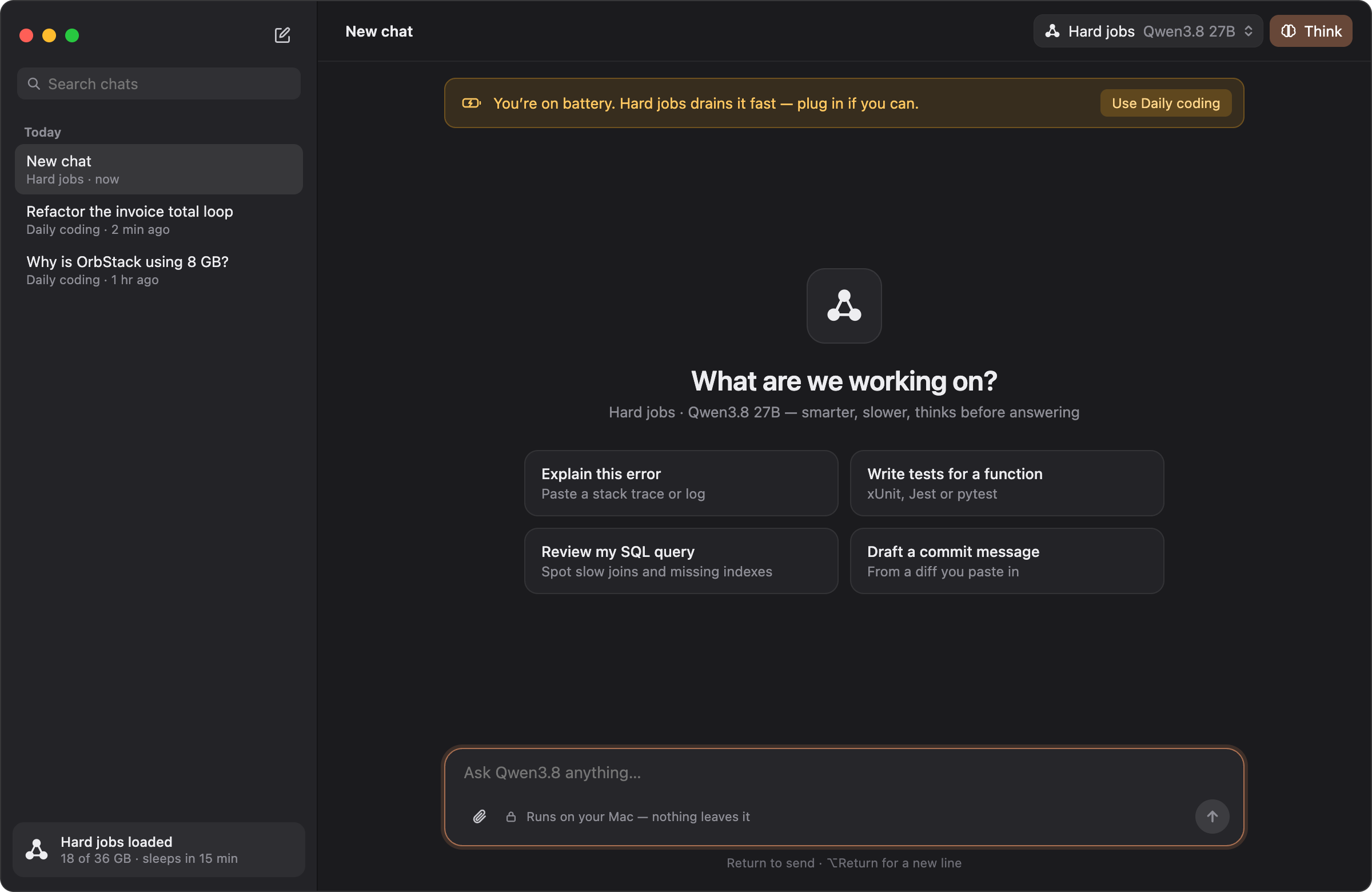
Ingle is a native macOS application that brings the power of large language models directly to developers' workflows — entirely locally, with no cloud dependencies. It combines a menu-bar interface, a full-featured chat window, and a VS Code extension into one cohesive toolchain designed specifically for Apple Silicon Macs.
Built around the Ollama engine (now running on Apple's MLX framework), Ingle lets developers run models like Qwen locally while maintaining complete data privacy. Nothing leaves the machine unless the user explicitly enables web search.
It's for developers who work with sensitive IP, teams handling confidential codebases, and anyone who wants AI assistance without sending their code to a remote server.
Most AI coding assistants require cloud APIs — sending code, context, and conversation history to remote servers. This creates several problems:
There was no tool that offered genuinely powerful local-first AI with the depth of features developers needed — without sacrificing privacy or requiring constant connectivity.
How might we build an AI coding assistant that keeps everything on the user's Mac while offering the same depth of features as cloud-based alternatives?
Next project
Infinity Tracker
Defined the core system: a menu-bar app with two named assistants (Ember for speed, Flint for depth), an Ollama/MLX engine layer, persistent memory storage, and a matching VS Code extension. Decided on Apple Silicon optimisation as a first-class requirement — MLX for maximum inference performance on M-series chips.
Ember (Qwen3.6 35B) for fast everyday coding, Flint (Qwen3.8 27B) for deep problems. Both share the same memory, rules, skills, and commands. Users can add custom models with their own names and personalities.
No cloud dependencies, no API keys, no data leaving the Mac. The Ollama engine runs locally; MLX powers inference on Apple Silicon.
Ask (everything asks), Edit (file edits auto-approved), Auto (safe commands too), Plan (read-only with numbered plans), Debug (reproduce → state cause → fix → confirm). Each mode controls what requires user approval.
Low through Max, controlling how thoroughly the assistant works. High encourages task lists; Max adds a read-only helper review at the end.
Read-only tools powered by language servers (sourcekit-lsp for Swift, typescript-language-server, pyright, gopls, rust-analyzer). Outline, definition, references, callers/callees, impact analysis, diagnostics, and exhaustive file reading.
Long-term memory stored in ~/.ingle/memory/ as Markdown files. One file per subject (about-me, preferences, work, projects, people). Memories are attached automatically to relevant chats; users can search, save, rewrite, or forget facts.
Everything editable in ~/.ingle/: commands (enforced rules), rules (loaded on demand), skills (Claude's format), MCP servers (auto-picked up from Cursor and Claude configs), and INGLE.md (the assistant index).
A matching chat tab sharing the same memory, rules, skills, commands, and history. Repo maps, file search, code editing with diffs, command execution, and problem detection.
Challenge
Running 35B and 27B parameter models locally on Mac hardware requires careful memory management. The solution was MLX integration (via Ollama v0.30+) for native Apple Silicon optimisation, keeping context windows at 32K tokens to balance depth with available RAM.
Challenge
Ember and Flint are different models but share the same memory, rules, skills, and commands. The challenge was ensuring each assistant's personality and behaviour stayed distinct while still benefiting from shared knowledge. Solved through separate model assignments with a unified extension system.
Challenge
The ~/.ingle/ folder contains commands, rules, skills, MCP servers, and the INGLE.md index. Too much power can paralyse users. The solution was auto-discovery (picking up configs from Cursor and Claude), sensible defaults, and progressive disclosure through Settings panels.
Challenge
Language server tools (outline, references, callers, impact) need Node.js and the right language servers installed. Without them, the system falls back to text search with an "approximate" label. The challenge was making this fallback graceful and transparent.
Challenge
Every feature had to be evaluated against the core principle: nothing leaves the Mac unless explicitly enabled. Web search is opt-in. Memory can be toggled off. Secrets are stored separately from memory with Touch ID verification. This constraint shaped every architectural decision.
100% local
Zero cloud dependencies; all inference runs on the user's Mac
2 assistants
Ember for speed, Flint for depth, sharing the same memory and extensions
5 workflow modes
Ask, Edit, Auto, Plan, Debug — each controlling approval behaviour
4 effort levels
Low through Max, scaling response depth
6 settings tabs
General, Models, Mac Access, Secrets, Web & Memory, Extensions
8+ coding tools
Outline, definition, references, callers, callees, impact, diagnostics
Local-first doesn't mean feature-poor. The biggest assumption going in was that a local-only tool would have to sacrifice capabilities. In practice, the constraint of "nothing leaves the Mac" forced better design decisions — cleaner architecture, more explicit state management, and tools that actually respect user control rather than assuming it.
Two assistants is more than the sum of their parts. Ember and Flint aren't just different model sizes; they represent two different interaction modes. Fast and practical versus slow and thorough. Having both, sharing the same memory and extensions, creates a workflow where you can switch context without losing continuity. It's a pattern worth exploring further.
Extensibility is powerful but needs guardrails. The ~/.ingle/ folder with its commands, rules, skills, and MCP servers gives users enormous power. But that power requires documentation, sensible defaults, and progressive disclosure. The auto-discovery from Cursor and Claude configs was a key insight — meet users where they already are rather than asking them to start from zero.
Memory changes everything. Persistent memory across sessions transforms the tool from a chat interface into something closer to a collaborator. It remembers preferences, project context, past decisions. But it also raises questions about what should be remembered, how to correct mistakes, and when to forget. The memory system is still evolving.
The learning curve is real but worth it. Ingle isn't a simple chat app. It has modes, effort levels, code intelligence, an extensible plugin system, persistent memory, and a full settings architecture. Casual users may find it overwhelming at first. But for developers who need depth — the kind who work with sensitive code or complex codebases — that depth is exactly what they're looking for.
Apple Silicon is underrated for local AI. Running 35B and 27B models on M-series chips via MLX is genuinely impressive. The unified memory architecture, the Neural Engine, the MLX framework — together they make local inference feel almost frictionless. This isn't a compromise; it's a competitive advantage.
Privacy is a feature, not a constraint. When you build with "nothing leaves the Mac" as a non-negotiable rule, it shapes every decision. You get cleaner architecture, more explicit user control, and tools that respect boundaries. The privacy-first approach didn't limit what Ingle could do — it clarified it.